
Last Tuesday, my AI coding assistant insisted this was the correct way to launch an EC2 instance:
# AI's suggestion - looks good, right?
ec2.run_instances(
    ImageId='ami-12345678',
    InstanceType='t3.micro',
    MinCount=1,
    MaxCount=1,
)
Except AWS now requires IMDSv2 metadata options for security compliance. This code would at best fail instantly, at worst, misconfigure my entire environment silently.
Three hours and 47 browser tabs later, I found the actual solution buried in AWS’s latest docs. My AI had been confidently wrong because it was searching through:
- 2019 blog posts (pre-IMDSv2)
- Outdated Stack Overflow answers
- Tutorials from AWS’s old documentation
- Everything except what I actually needed
That’s when I realized: My fancy RAG setup was just organizing garbage more efficiently.
What You’ll Learn
In the next 10 minutes, I’ll show you:
- Why even good RAG systems serve up outdated code
- How Ref solves this with AI-first documentation search
- The exact commands to deploy Ref as an MCP server with mpak
- Real benchmarks: 47,000 tokens → 3,200 tokens for the same query
Let’s fix your AI agents.
The Problem We’re All Facing (But Nobody’s Fixing)
We’ve all built RAG systems. Vector databases, embeddings, the works. And they help! But here’s what I’d been missing: even the best RAG setup is only as good as what it’s searching through.
My RAG pipeline was beautiful. It was also retrieving:
- Outdated EC2 tutorials from 2019 (pre-IMDSv2)
- Blog posts with “close enough” code that actually wasn’t
- Stack Overflow answers that worked once upon a time
- Official docs… from three versions ago
I needed better search. That’s when I found Ref.
Ref: Search Built for How Developers Actually Work
Matt Dailey built Ref because he was tired of AI agents confidently serving up deprecated code. But here’s what caught my attention - he didn’t just build another search API.
Ref understands how developers actually need documentation:
- Version-aware: Knows when methods were deprecated or added
- Code-first: Returns executable snippets, not blog posts about concepts
- Authority-based: Prioritizes official sources over tutorials
- Structure-preserving: Maintains code formatting, comments, and context
But the real kicker? It’s built as an MCP server from day one.
What really sold me: their custom crawler is tuned specifically for technical documentation. When docs have those tabbed code examples (Python | Java | Node), Ref actually reads each tab separately. Ask for Python, get Python - not whatever tab happened to be visible when the crawler passed by.
Why This Matters for MCP Users
If you’re using Claude, Cursor, or any AI coding tool that supports MCP, adding Ref gives your agent access to current, authoritative documentation instead of whatever it scraped during training.
Here’s why this combination works so well:
- MCP makes integration trivial - No custom API wrappers or prompt engineering. Plus, Ref uses the full MCP spec to return rich, structured data - not just plain text.
- Ref returns structured data - Not just text dumps for your agent to parse
- mpak handles the packaging - One command to install. Pre-bundled dependencies. No build step.
No partnership needed - just good tools that work well together.
How to Deploy Ref with mpak
Here’s the fun part - getting it all working in under 2 minutes.
Step 1: Install mpak
npm install -g @nimblebrain/mpak
mpak is an open-source registry for MCP server bundles. Every bundle ships with all dependencies pre-packaged - no build steps, no version drift.
Step 2: Get Your Ref API Key
Head over to https://ref.tools and grab an API key. The onboarding is refreshingly simple and takes less than 30 seconds.
mpak config set @nimblebraininc/ref-tools-mcp api_key=YOUR_API_KEY
Step 3: Run Ref
mpak run @nimblebraininc/ref-tools-mcp
mpak downloads the bundle, caches it locally, and starts the Ref MCP server over stdio. All dependencies are included in the bundle - no npm install, no network calls at startup.
Step 4: What Ref Returns
When your agent queries Ref, you’ll get back raw, structured search results like this:
overview: page='Amazon EC2 examples - Boto3 1.39.14 documentation'
section='unable-to-save-cookie-preferences > amazon-ec2-examples'
url: https://boto3.amazonaws.com/v1/documentation/api/latest/guide/ec2-examples.html#amazon-ec2-examples
moduleId: boto3
overview: page='EC2 - Boto3 1.39.14 documentation' section='unable-to-save-cookie-preferences > furo-main-content > ec2 > client'
url: https://boto3.amazonaws.com/v1/documentation/api/latest/reference/services/ec2.html#client
moduleId: boto3
overview: This page provides code examples and instructions on how to use the `RunInstances` API with various AWS SDKs and the AWS CLI to launch Amazon EC2 instances. It includes examples in multiple programming languages such as .NET, Bash, C++, Java, JavaScript, Kotlin, PowerShell, Python, Rust, and SAP ABAP, along with CLI examples demonstrating different use cases.
url: https://docs.aws.amazon.com/ec2/latest/devguide/example_ec2_RunInstances_section.html
moduleId: amazon-ec2
overview: page='Amazon EC2 - Boto3 1.39.14 documentation'
section='unable-to-save-cookie-preferences > furo-main-content > amazon-ec2 > launching-new-instances'
url: https://boto3.amazonaws.com/v1/documentation/api/latest/guide/migrationec2.html#launching-new-instances
moduleId: boto3
Alright! Boto 1.39 is recent. API links look real… this is good. But not really helpful to me in this format.
That’s because this format makes it easy for your agent (not you) to find what it needs. Ref is using the full MCP spec here to provide structured data - URLs, module IDs, and context - that agents can parse immediately.
Step 5: Connect Ref to Claude Desktop
Add this to your Claude Desktop MCP configuration file:
macOS: ~/Library/Application Support/Claude/claude_desktop_config.json
{
  "mcpServers": {
    "ref-tools-mcp": {
      "command": "mpak",
      "args": ["run", "@nimblebraininc/ref-tools-mcp"]
    }
  }
}
Restart Claude Desktop - it will now have direct access to Ref through the MCP server.
Tip: Open Claude settings → MCP Tools to verify that
ref-tools-mcpis active.
You can also add it to Claude Code:
claude mcp add ref-tools-mcp -- mpak run @nimblebraininc/ref-tools-mcp
Step 6: See the Magic in Action
Now let’s ask Claude to solve our original problem. Here’s what happens when I ask about launching EC2 with IMDSv2.
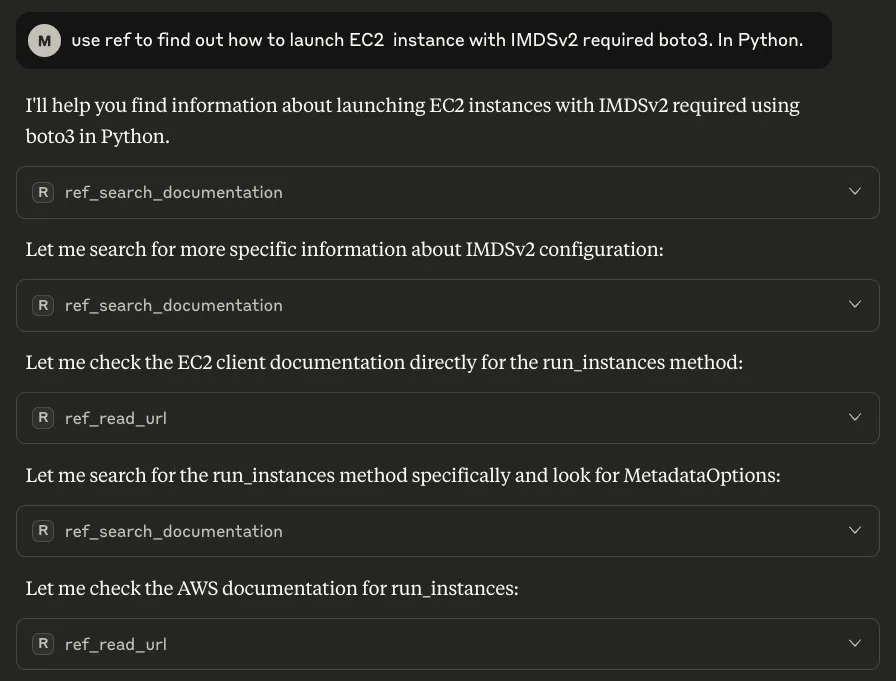
And after a few tool calls and MCP magic.. we get the answer we’re looking for!
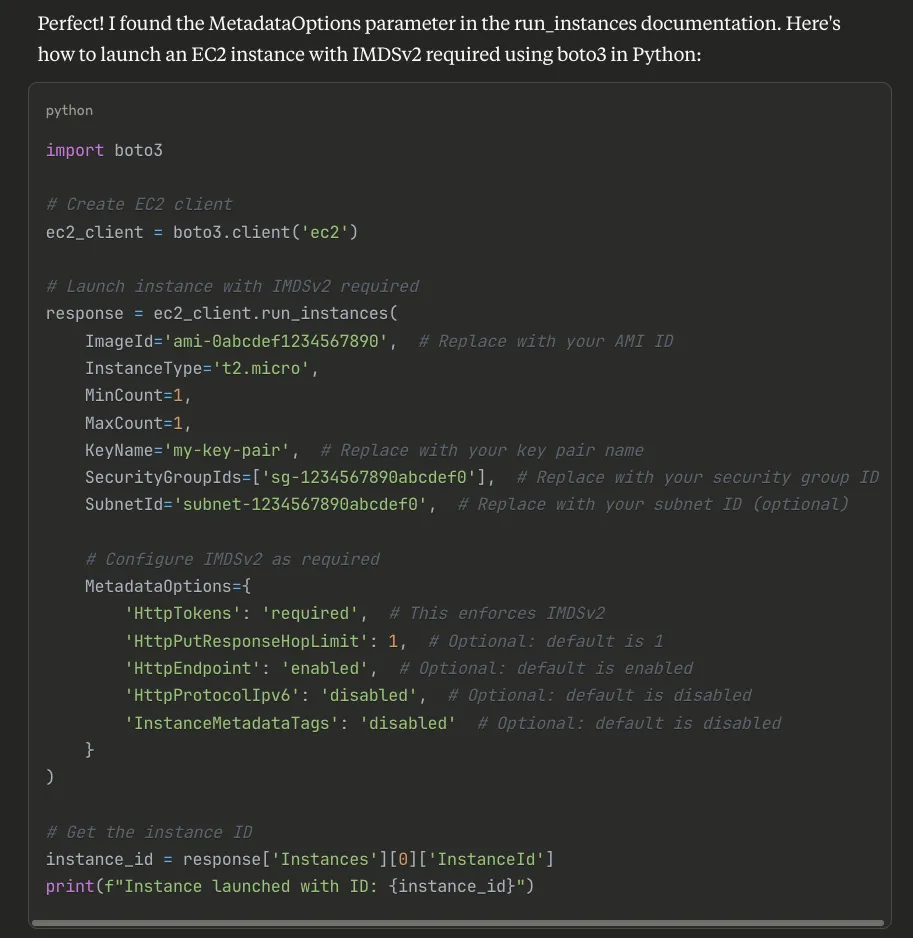
Notice what Claude found that my original AI missed:
- The required
MetadataOptionsparameter - All four metadata settings (not just
HttpTokens) - Current parameter names and values
- Even included helpful comments
This isn’t a guess or amalgamation of old examples. It’s the exact, current pattern from AWS’s official boto3 documentation.
What Makes Ref Different
After a week of using it, here’s what I’ve noticed:
-
Purpose-Built for Technical Docs: This isn’t general search with some filters. Ref was built specifically for technical documentation, and it shows.
-
Smart Crawling: It handles tabbed code examples correctly. If docs show Python/Java/Node tabs, you get the Python snippet when you ask for Python. Sounds obvious, but try getting this from other search tools. Their custom crawler understands technical documentation structure in ways generic crawlers miss.
-
Always Current: Ref continuously crawls official sources. When AWS updates their docs, Ref knows within hours.
-
AI-First Design: Returns structured data that AI agents can immediately use. No parsing HTML or extracting code from prose.
Real Results From My Testing
I ran some benchmarks. Same queries to my RAG system vs. Ref via MCP:
Query: “How to launch EC2 with IMDSv2 enforcement”
Traditional RAG:
- 15 retrieved chunks
- 3 different approaches (conflicting)
- 50% outdated information
- 47,000 tokens used
- Required manual verification
Ref via MCP:
- 2 authoritative sources
- Current implementation only
- Included breaking changes warning
- 3,200 tokens used
- Copy-paste ready
The token savings alone justify the switch.
What’s happening here? Ref finds exactly the context my agent needs without adding junk that wastes the context window. No more sifting through 15 tangentially related chunks just to find the one line that matters.
The Dashboard Is Actually Useful
Every search through Ref shows up in their dashboard:
- See exactly what your agents searched for
- Track which docs were pulled
- Monitor token usage
- Verify sources for any answer
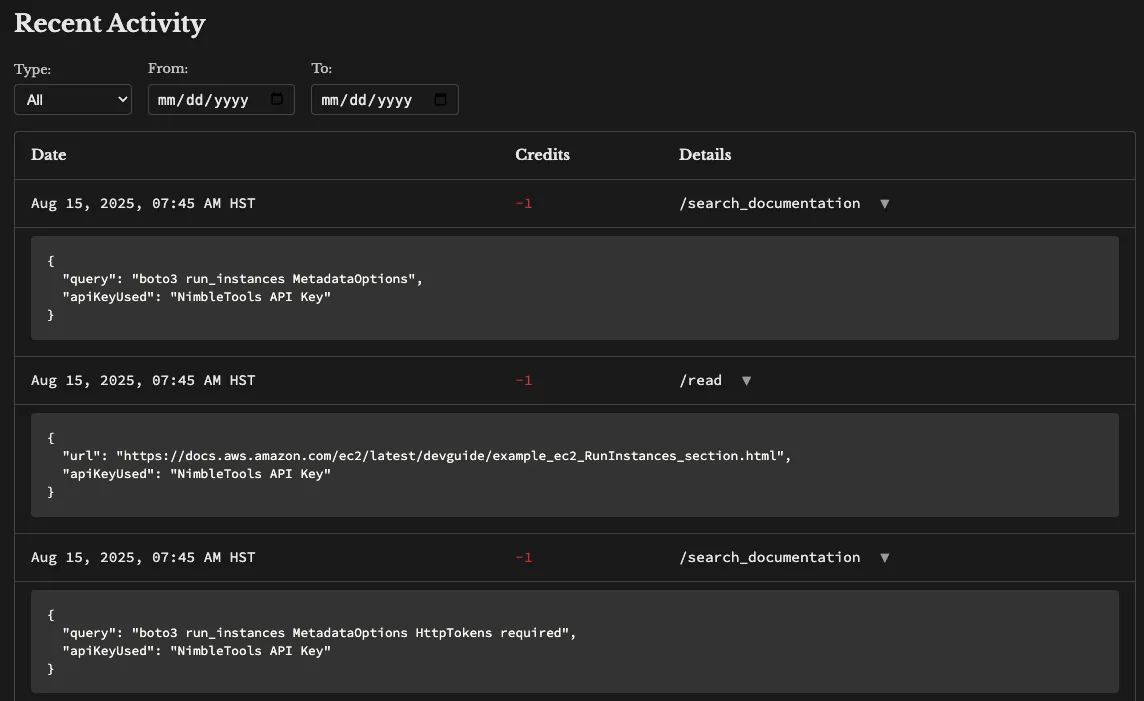
This transparency matters when you need to audit where your AI’s advice came from.
Beyond Basic Search: What’s Possible
Since Ref is just another MCP server, you can compose it with other tools in your setup:
Example workflow I built:
- Ref finds the current EC2 launch pattern
- Another MCP service pulls our internal instance configurations
- A third service validates against our security policies
- Agent combines all three to generate compliant, current code
The beauty of MCP is that each service does one thing well.
Why This Stack Makes Sense
I discovered Ref while looking for better search tools for my AI agents. The fact that it was already MCP-compatible meant I could deploy it with mpak immediately.
No integration work. No custom adapters. Just install and use.
That’s the power of standards like MCP - tools that follow the spec just work together. And with mpak bundles, you get pre-packaged, tested servers that start in seconds without fetching dependencies at runtime. We wrote about the engineering behind this in How We Built a Production MCP Registry and the security model in mpak: The Secure MCP Server Registry.
Try It Yourself
You can try this right now:
- Install mpak:
npm install -g @nimblebrain/mpak - Run Ref:
mpak run @nimblebraininc/ref-tools-mcp - Add it to your Claude Desktop or Claude Code config
- Query something that usually returns outdated info
When you see current, accurate code instead of the usual chaos, you’ll understand why I’m excited about this combination.
What This Means
Stop feeding your AI agents garbage and expecting gold. Ref gives them exactly what they need: current, authoritative, structured documentation. mpak makes it trivial to deploy.
One command. One standard (MCP). Zero integration headaches.
Your AI agents deserve better than outdated Stack Overflow posts. This is how you give it to them.
Special thanks to Matt Dailey for building Ref - it’s exactly what I’d been looking for. If you’re building MCP-compatible tools, reach out. We’re always looking for quality servers to add to the mpak registry.
Developers: The Ref MCP implementation is open source on GitHub. It’s a great example of a well-built MCP server.
Have questions about building MCP servers? Drop us a line at hello@nimblebrain.ai.
Share this post
Last updated March 3, 2026